


I have found the Vikas and he is amazing developer, he had always delivered the product under the timeline, on budget and with 100% accuracy, He is totally problem solving guys.
Trim word in drupal 7 through Smart Trim
Hi guys, in this tutorial i am going to show you, how to trim the word through Smart Trim module. Sometimes we need to show the limited characters length or words in our projects and rest character or word have to hide. There is lots of way to do it, but i am showing the easiest and best way to do it.
Step 1:
Download Smart Trim module
Go to admin/modules and enable it.
You can download it through drush too.
drush dl smart_trim drush en smart_trim
Step 2:
Create a content type or edit existed content type.
Now click on Manage display tab.
Selct Smart trimmed from Format dropdown of that field which you want to trim .
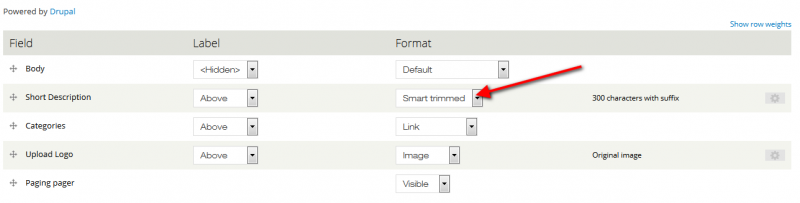
Now click on Setting icon.

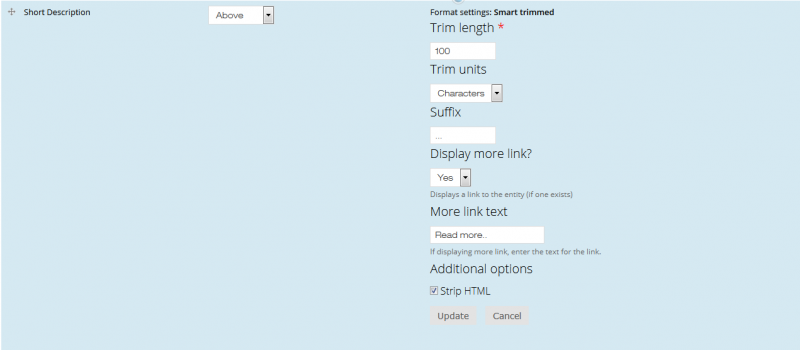
Give the length of word or character in the Trim length text box.
Choose what have to trim, Word or Character from trim units select box.
Select Yes from Display more link?, if you wanna give link.
Give the link text in the text box of More link text.
Now click on Update button.
Click on Save button to save the configuration.
Step 3:
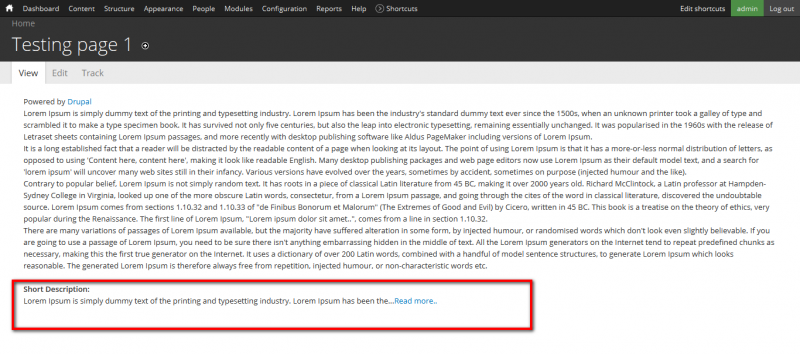
post some content and see the result.




































































Add new comment