


I have found the Vikas and he is amazing developer, he had always delivered the product under the timeline, on budget and with 100% accuracy, He is totally problem solving guys.
How To Create block Type in Drupal 7 ?
Creating content type in Drupal we all know how to do this. Similarly we can create block type in Drupal with the help of Bean module. Bean module gives the way to create block type, manage field, display field and so on. Here i am showing to create block type and post block through created block type.
Step 1:
Download Bean
Go to sites\all\modules and extract it.
Go to admin/modules and enable the module.
Step 2:
After enabling the module you would be see a link Block Type under Structure in your administrator menu
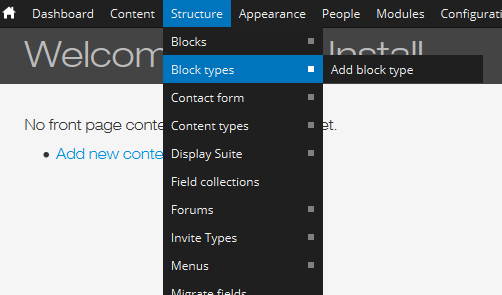
Or go to admin/structure/block-types/add
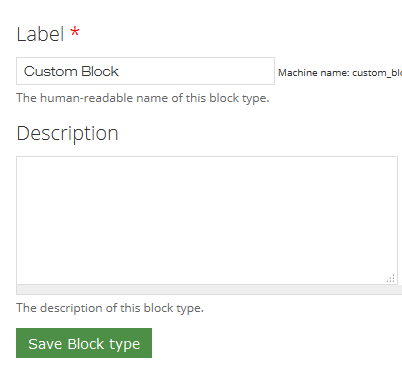
Give the name of your Block Type.
Click on Save Block type button.
Step 3:

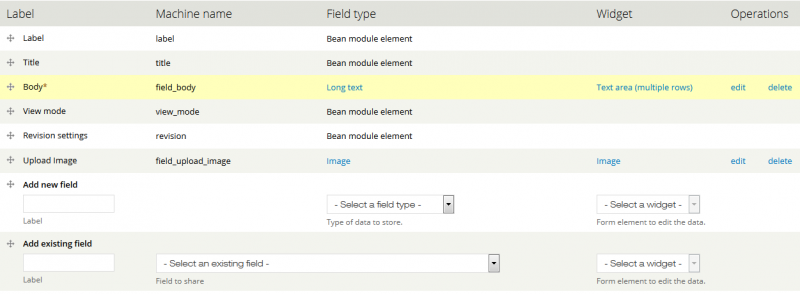
Click on manage fields link
Add field according to your requirement and save it.
Step 4:
Now time to create block through your block type which you have created.
After creating your block you would find it in your block pages admin/structure/block
As i have posted two block with Title Custom Block 1 and Custom Block 2.





































































Add new comment