


I have found the Vikas and he is amazing developer, he had always delivered the product under the timeline, on budget and with 100% accuracy, He is totally problem solving guys.
How To use font awesome icons ?
In some sites we need to add icons, and we usually use image for that. But when we need to resize, change color or anything we can't do it in easy way. But with the font icons, we can do it in easy way. Here, in this tutorial i am telling how to use it with Font Awesome in Drupal.
Step 1:
Download Menu attributes
Enable it
Step 2:
Go to admin/structure/menu/settings
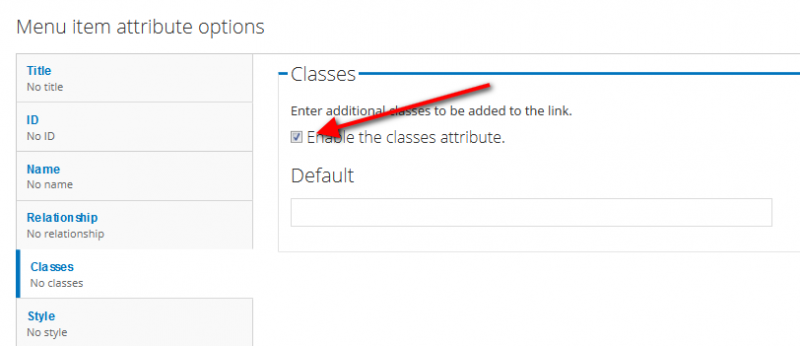
Click the Classes tab from the bottom of the page and check the box of Enable the classes attribute.
Step 3:
Go to your theme directory and open template.php file.
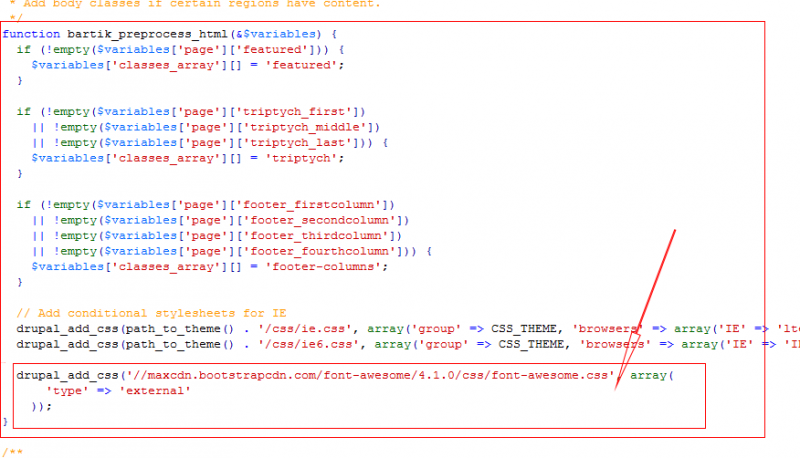
paste below code in your template.php, and replace YOURTHEMENAME with your theme name, which you are using and save it.
function YOURTHEMENAME_preprocess_html(&$vars) { // Add font awesome cdn. drupal_add_css('//maxcdn.bootstrapcdn.com/font-awesome/4.1.0/css/font-awesome.css', array( 'type' => 'external' )); }
Step 4:
Go to admin/structure/menu/manage/main-menu
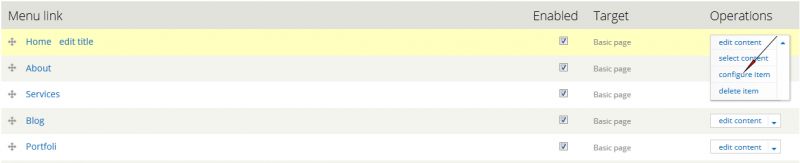
Click on Configure item of the link, in which you want to add icon
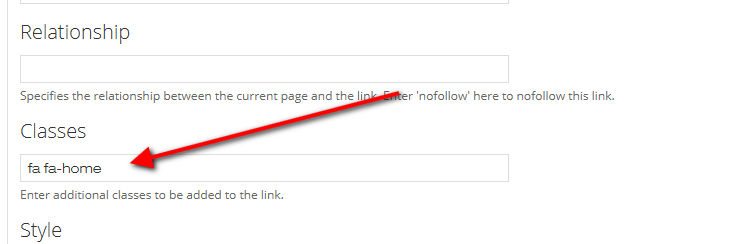
In the classes box give the class fa fa-home.
Click on Save button.
Now go to your home page and see the link. it would be something like this.

Similarly you can add more icon to any link. Just you have to put the class in Classes text box of the link.
You can find class of that icon from http://fortawesome.github.io/Font-Awesome/cheatsheet/







































































Add new comment